
New to ReStory: Chill Electronics Repairs? A beginner's guide to your first days — opening tasks, repair basics, what to buy first and the costliest mistakes.
ReStory Beginners Guide — How to Start Your Repair Shop
ReStory: Chill Electronics Repairs starts you in a bare storefront in mid-2000s Akihabara with a screwdriver, a brush and a landlord who wants rent. The first few in-game days are gentle — the game deliberately walks you through every system — but a handful of habits separate smooth early progress from a money-bleeding start. This guide covers the opening tasks, the core repair loop, what to spend your first yen on, and the beginner mistakes worth avoiding (for the full systems breakdown, see our main guide and repair mechanics guide).
Here's what you'll learn:
- The opening tasks and how to open the shop
- The repair loop, step by step
- What to buy first with your early yen
- How to keep the shop profitable
The First Day: Opening the Shop
Your first day follows a fixed script: clean the work area, sort the inventory, throw away the empty boxes, then open the shop. The one task that trips up new players is opening — there's a switch to the right of the shop window (you can turn your head left and right to find it). Flip it and the shutters go up; your first customer, the landlord Hashimoto, arrives with his phone.
Don't skip the small stuff on day one: clearing dirty items off the desk is the "Clean Job" achievement, and keeping a tidy bench keeps your customer reviews up later.
The Repair Loop: What You'll Do All Day
Every repair follows the same rhythm, and it's worth internalizing early (full detail in the repair mechanics guide):
- Take the order — customers arrive in person; online orders arrive by email later
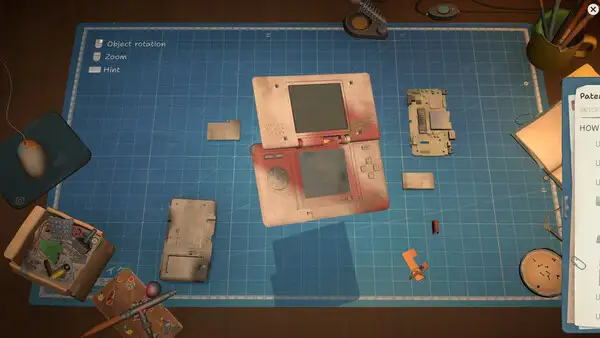
- Disassemble — remove the case, screws, cables and components in the right order
- Clean — dirt, dust and corrosion cause most "mystery faults"; clean before buying parts
- Diagnose — find the real fault: dead battery, cracked screen, fried board
- Fix — replace parts (from stock or ordered online) or repair the component
- Reassemble — put it back together correctly
- Deliver — return it, take payment, empty the tip jar
The most expensive beginner habit is buying parts before cleaning. Corroded contacts and sticky buttons look like dead components. Open the case, clean everything, test again — most early repairs resolve without spending a yen.
What to Buy First (in Order)
Your early yen is scarce — rent is 2,000 yen a week and profits are thin at first. Prioritize in this order:
- Upgrade the screwdriver — the professional screwdriver (11,000 yen) makes repairs dramatically faster and prevents stripped screws. It's the single best purchase in the game
- Stock common spare parts — batteries, screens, buttons and charging ports cover most customer requests. Buy them before you need them
- A brush upgrade — better brushes speed up cleaning, which is most of your early work
- The tip jar — it quietly becomes one of your steadiest income streams; never ignore it
Hold off on express shipping, decorative items and the marketplace lootboxes until the business is stable.
Keeping the Shop Profitable
- Plan parts ahead — the in-game browser is deliberately slow, and express shipping eats margins. Order what you'll need in a day or two, not in an emergency. (Your real internet speed doesn't matter — the browser's slowness is simulated for everyone; see our online orders guide)
- Online orders are easy money — once you get an internet connection and accept email orders, they pay well. Prioritize them when deadlines allow
- Don't throw away broken components — they're harvestable for spare parts
- Get licenses when you can — licenses unlock the device categories that pay the most (see the licenses guide)
- Refuse payment sometimes — doing a kid's request for free triggers a special thank-you and the Origami achievement (see the achievements guide)
Common Early Mistakes
- Rushing disassembly — stripping a screw turns a simple repair into a salvage job. Use the right screwdriver and work in a consistent order
- Buying before cleaning — covered above; it's the #1 money drain
- Ignoring customer conversations — the dialogue is where the branching story, hidden requests and some achievements live
- Skipping the notebook — repair instructions, schematics and license progress all live there; check it when stuck
At launch, a known bug affected firmware updates on the Guitar Legend and MyPod devices. If an update gets stuck, it's a known issue being patched — see the firmware update guide for the workaround.
FAQ
How do I open the shop in ReStory? After cleaning the work area and sorting inventory, look for the switch on the right side of the shop window — you can turn your head to find it. Flip it to raise the shutters and take your first customer.
What should I buy first in ReStory? The professional screwdriver (11,000 yen) is the best early purchase, followed by stocked common spare parts (batteries, screens, buttons, charging ports) and a brush upgrade. Avoid express shipping and decorative items early.
How do I make money fast in ReStory? Clean before buying parts, plan spare-part orders ahead, accept online orders once you have internet, empty the tip jar regularly, and upgrade tools to speed up each repair. Licenses unlock higher-paying device categories.
Do I need a fast internet connection for ReStory? No — the in-game browser's slow loading is simulated and identical for everyone. Your real connection speed doesn't affect the game (it's single-player and offline-capable).
Related Guides
- ReStory Guide — Everything You Need to Know
- ReStory Repair Mechanics — Tools & Process
- ReStory Tips and Tricks
- ReStory Licenses — The Real Progression System
- Does ReStory Use AI Art? The Facts Behind the Controversy
Official resources: Steam store page · Steam news hub · Gematsu announcement · IGN game page · GOG store page Last Updated: August 12, 2026
More ReStory: Chill Electronics Repairs Guides
The ReStory: Chill Electronics Repairs mod scene — trainers like WeMod and PLITCH, cheats (money, time freeze), and the state of official modding support.
Our ReStory: Chill Electronics Repairs review — 98% positive on Steam, a Metacritic 84, what it does brilliantly and the honest caveats before you buy.
Official ReStory system requirements: Windows and Mac minimums from the Steam page, plus what hardware actually matters for a smooth repair-shop session.
12 ReStory: Chill Electronics Repairs tips from launch-week players — cleaning order, spare-part economy, tool priorities and the story choices that matter.
Every ReStory: Chill Electronics Repairs update — launch-day known issues (firmware bug, achievement unlocks), the first patch timeline and developer promises.
A practical ReStory: Chill Electronics Repairs walkthrough — opening script, weekly rhythm and the milestone order for tools, licenses and online orders.