
How to play hololive Dreams: six-lane rhythm controls on mobile and keyboard, every note type, judgments, autoplay, and settings that fix accuracy.
hololive Dreams How to Play — Controls, Notes, and Scoring
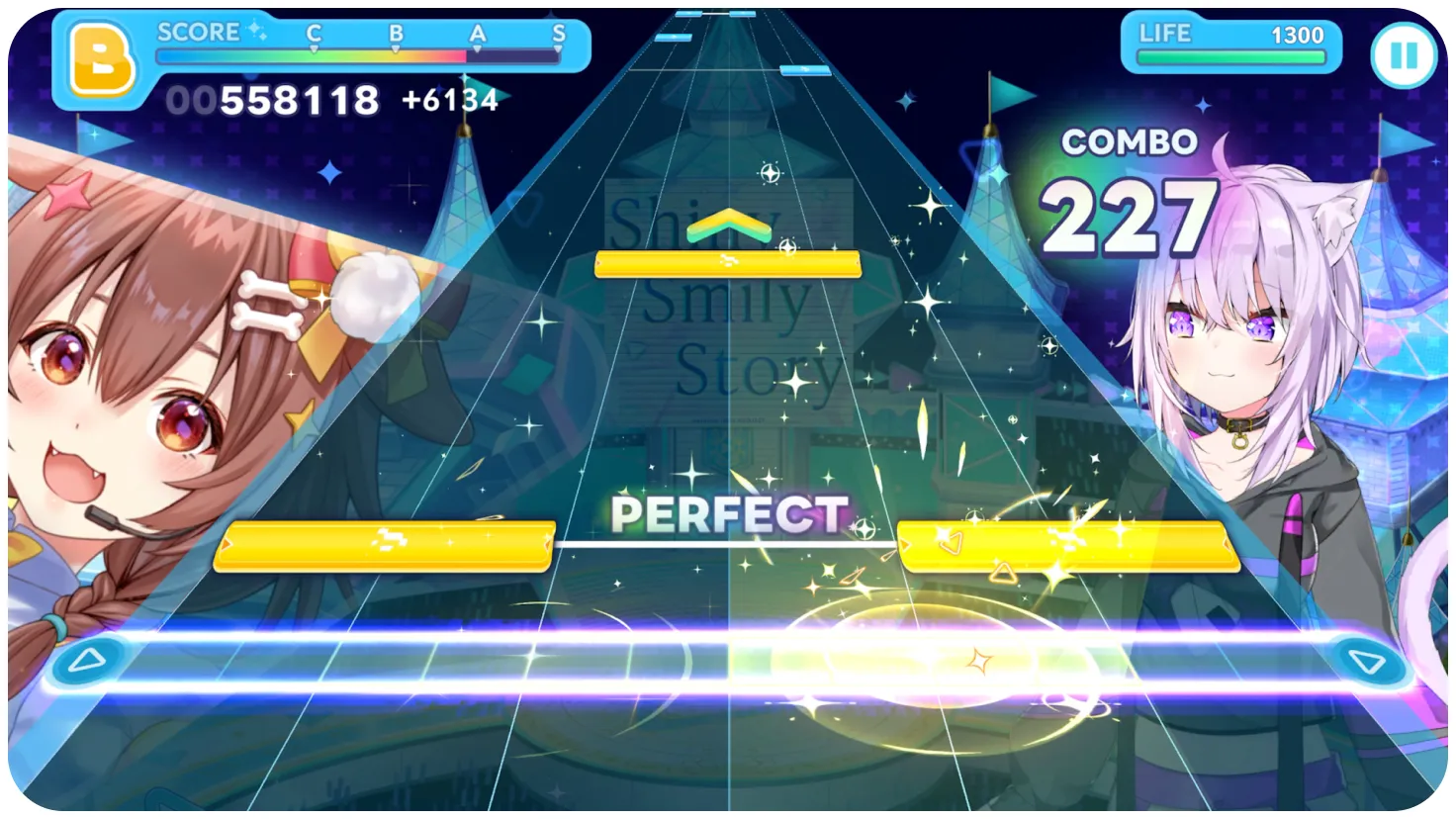
The rhythm half of hololive Dreams (holodori) is a six-lane falling-note game — wider than BanG Dream!'s four lanes or most Project Sekai charts, which is the first thing new players notice. Notes travel down six columns toward a judgment line while the official music video or concert footage plays behind them. Your job is to hit each note at the line, but the score you get depends on more than timing: team strength, leader costume, skills, and the holomem Board all multiply your rhythm result. This guide covers the controls on every platform, each note type, the judgment ladder, the score formula, and the settings that improve accuracy fastest. For team math, see the team building guide.
Controls on Mobile and PC
Mobile (iOS/Android): tap lanes directly. Standard rhythm-game touch controls — tap for taps, hold for long notes, flick for flicks. Most players use both thumbs on a phone, or one finger per hand on a tablet.
PC keyboard: the six lanes map to S D F / J K L by default — the left hand covers the first three lanes, the right hand the last three. This mirrors touch lanes one-to-one and is remappable in settings (a "How to Change Controls" video series and the Steam discussion thread on controls document the remap flow). Community consensus on the hololive Dreams subreddit is that keyboard play is playable but the default layout feels like touch controls forced onto keys — remapping to your osu!mania or Quaver muscle memory helps. One quirk: multi-line notes only need any one key from that lane's line.
Controller: not officially documented in detail. NamuWiki's system page reports partial controller support — e.g., DualShock works for Mega Circuit (dash/jump) but not fully for some interaction prompts. Treat controller support as partial until officially confirmed; the platforms guide covers this honestly.

Note Types
- Blue notes — tap when they reach the judgment line. The bread and butter.
- Green notes — hold from head to tail. The end point isn't judged strictly, and you can lift a finger mid-hold and re-press (NamuWiki documents this leniency).
- Pink notes — flick in the arrow's direction; the direction doesn't actually matter, and consecutive flicks can be done by holding and sliding.
- Yellow notes — accent notes: easier to time, louder sound, PERFECT-friendly. Long notes and flicks can also appear as accent notes.
- Gray notes — only when you enable rhythm support: off-beat regular notes turn gray, which helps you read the beat.
- Damage notes — appear only in player-created charts (Create Chart mode); they deal damage when pressed.
Judgments and the Score Formula
Judgments run PERFECT → GREAT → GOOD → BAD → MISS, with scoring multipliers of roughly 1.0 / 0.8 / 0.5 / 0 / 0 (per the community-documented judgment table). Combo matters, but the final score is a team product:
Score ≈ rhythm accuracy × team performance, where team performance = leader costume skill + attribute synergy (Cute/Happy/Pure) + affinity synergy (Performance/Sense/Technique) + generation synergy + member levels + awakening/uncaps + holomem Board nodes.
Two players can hit identical notes and get very different scores — that's intentional. For example, the tutorial's projected unit score panel shows exactly how much each component contributes (active skills, special skills, parameters, outfits, passives).
Official source: the official System page frames the loop behind the scoring: "Play rhythm games, mini games, and complete quests" with "Play anytime, as many times as you want" — the note mechanics and judgment ladder above follow the community-documented behavior on that system.
The selected leader must be a singer on the chart you're playing — for solo songs that's one member; for unit or ensemble songs, any participating vocalist qualifies. This rule blocks a lot of otherwise-perfect teams, so check it before you build.
Difficulties, Note Speed, and Autoplay
Every chart ships in EASY, NORMAL, HARD, and EXPERT, with per-song level numbers (the hardest regular charts cap around level 30; community uploads show EXPERT Lv.24–29 clears and one famous Lv.30 first-clear). Difficulty is a chart property, not a global setting.
- Note speed ranges from 1.00 to 12.00. Most players run 8–10; the default (~5.0) stacks notes too densely for many beginners. Higher speed = wider note spacing = easier reading. Details in the difficulty guide.
- Auto-play consumes one auto ticket per use and clears the song for you. Rewards count normally, but the score is capped — community documentation reports auto-play scores at 80% of manual and no combo bonus. Use it for learning charts, daily clears, or when you're out of time, not for leaderboard attempts.
- Mirror option flips charts left-right — a classic rhythm-game tool for hand-dominance issues.
Scoring Modes and Leaderboards
- Live Alone — single-player clears; your score feeds your member score rates.
- Live Together — multiplayer rooms (FREE / GRADE / PRIVATE), up to five players, with a shared fever gauge you charge together and activate during the highlight for bonus points. See the multiplayer guide.
- Score rate — per-member ranking based on your best score on that member's songs; not registered on the PC version as of August 2026 (a major Steam complaint, documented on the Steam community hub).
Settings That Fix Accuracy (Do These First)
- Raise note speed to 8–10.
- Enable FAST/SLOW display — see whether you're early or late and adjust.
- Enable the simultaneous-press guide line if you're missing chord notes.
- Enable rhythm support if dense off-beats are killing your combo — gray notes make the downbeat obvious.
- Adjust audio/visual calibration on the Steam version; PC players report needing a calibration session before the game feels right (another documented launch complaint).
Auto-play consumes an auto ticket per song. Tickets drop from mini-games, chests, and missions — you can't autoplay indefinitely, so save them for event grinding.
FAQ
What are the keyboard controls in hololive Dreams? The six lanes default to S/D/F (left hand) and J/K/L (right hand), remappable in settings. The Steam community discussion confirms multi-line notes accept any key in that lane's line.
What do the different notes mean? Blue = tap, green = hold, pink = flick (direction ignored), yellow = accent (easier timing, louder), gray = rhythm-support off-beats, and damage notes exist only in Create Chart mode.
How does scoring work? Final score = accuracy (PERFECT/GREAT/GOOD/BAD/MISS) multiplied by team performance — leader costume skill, attribute/affinity/generation synergies, levels, uncaps, and the holomem Board. A strong team with 95% accuracy beats a weak team with 99%.
Does hololive Dreams have autoplay? Yes. Auto-play consumes one auto ticket, clears the song for you, and keeps rewards, but caps the score (community-documented ~80% of manual, no combo bonus).
Related Guides
- hololive Dreams Difficulty Levels — EASY to EXPERT Explained
- hololive Dreams Songs — Full Song List & Unlocks
- hololive Dreams Create Chart — Custom Charts Guide
- hololive Dreams Members — Full Roster by Generation
- hololive Dreams Platforms — Steam, Mobile, Cross-Save, Deck
Official resources: Steam store page · Official System page · Wikipedia · NamuWiki System Last Updated: August 13, 2026
More hololive Dreams Guides
hololive Dreams songs: how many songs are in the game, the launch list by artist, unlock via holomem quests and Music Disks, and the best tracks to play first.
hololive Dreams system requirements: minimum and recommended PC specs, the 50 GB install and Windows 11 requirement, and how to fix performance issues.
hololive Dreams update history: Ver.1.0.100 and 1.0.101 patch notes, Streamer Mode, mini-game fixes, the announced roadmap, and what to expect next.