
Valheim Offline Companions — How to Hire NPC Companions and Make the Game Playable Solo
The Offline Companions mod for Valheim explained: how to install it, how to hire companions from Haldor, what they can do (fight, gather, farm, fish, smelt, repair), the spawn companion command, known bugs like the missing audio clip, and why it's the best 'bot to play with me' solution.
Valheim Offline Companions — How to Hire NPC Companions and Make the Game Playable Solo
The short version: Offline Companions is the most popular Valheim mod for solo players who want company. It lets you hire NPC companions from Haldor's shop — persistent AI allies with their own health, stamina, food, inventory, and voice lines, who fight alongside you, gather, forage, farm, fish, hunt, smelt, cook, repair gear, maintain your base, and follow you across the world. It's the community's answer to "I want a bot to play Valheim with me."
This guide covers installation, hiring, commands, and the known issues (including the famous missing-audio-clip bug).
What Offline Companions Is (and Isn't)
- What it is: A mod (by ProfMags) available on Thunderstore — the main Valheim mod database. It adds hireable, persistent NPC companions to the vanilla game.
- What it isn't: Not an official game feature, not a multiplayer bot that mimics real players in PvP, and not a cheat — companions use normal game systems (health, stamina, food) and die if you don't feed/equip them.
- Why "offline": The name means "companions you have even when you're playing alone/offline" — the mod exists specifically for solo players.
Search queries like "valheim bot to play with me" and "offline companions valheim spawn companion" are both about this mod: people want AI helpers because their friends aren't online. Offline Companions is the standard solution — hired NPCs who do chores and fight with you.
Installing Offline Companions
- Install a mod manager (recommended): Thunderstore Mod Manager or r2modman — both one-click install and auto-update mods for Valheim.
- Search "Offline Companions" in the mod manager and install (author: ProfMags).
- Or install manually: download from Thunderstore, extract into
BepInEx/plugins/, and make sure BepInEx (the mod loader) is installed first. - Launch Valheim — you should see the mod's config in the BepInEx config folder (
BepInEx/config/).
Like all Valheim mods, Offline Companions modifies the game client. If you care about vanilla achievements, run modded saves in a separate world or accept that the modded profile is for fun, not achievements.
How to Hire Companions
Companions are hired from Haldor's shop (the merchant in the Black Forest) once the mod is installed:
- Travel to Haldor (he's in the Black Forest — find the merchant icon on your map).
- Open his shop — the mod adds a "Hire Companion" tab/option.
- Choose the companion type you want (combat, gatherer, farmer, etc.) and pay the hire cost.
- The companion spawns and starts following you.
Spawning via command
If you can't reach Haldor (or want a specific setup), use the console (F5, enable devcommands):
spawn companion
or the mod's dedicated command (check the mod's config/changelog for the exact syntax — it varies by version; the current versions use in-game interaction commands rather than a single spawn string).
Early versions of the mod (and some video guides) used console spawning to test companions, which is why "offline companions valheim spawn companion" is a common search. In current versions, hiring through Haldor is the intended path; the console route still works for debugging.
What Companions Can Do
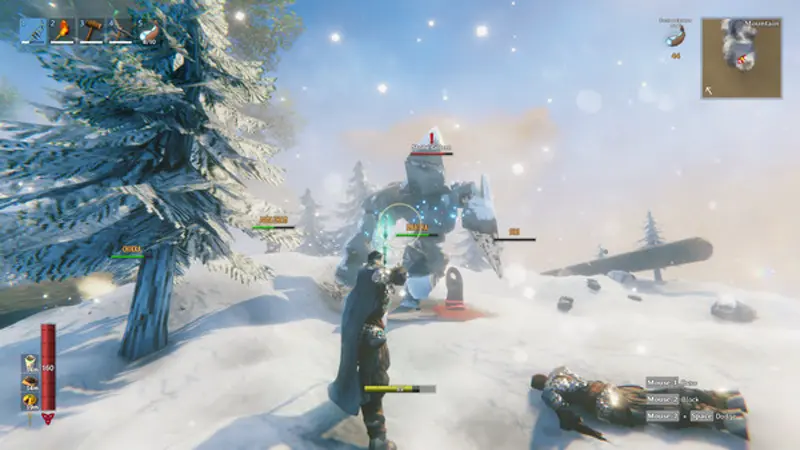
Hired companions are full-fledged AI teammates:
| Activity | What they do |
|---|---|
| Combat | Fight alongside you with weapons you give them; they have their own health and stamina |
| Gathering | Chop trees, mine rocks/ore, harvest resources |
| Foraging | Collect berries, mushrooms, and pickups |
| Farming | Tend crops (plant/harvest) |
| Fishing | Fish for you |
| Hunting | Track and kill animals |
| Smelting/Cooking | Operate furnaces and cooking stations |
| Base maintenance | Repair structures and gear, maintain your base |
- Their own systems: companions have health, stamina, food needs, inventory, and voice lines (they talk to you!).
- Persistence: they stay hired across sessions — your companion is there when you log back in.
- Follow & command: they follow you across the world; you can give context commands (point at objects to direct them) via the mod's hotkey/command system (full gamepad support added in later versions).
Configuring Companions
The mod's config (BepInEx/config/) lets you tweak:
- Companion stats (health, stamina, damage multipliers) — good if they feel too weak or too strong.
- Hire costs.
- How many companions you can have at once.
- Whether they auto-repair / auto-eat.
Most players run the defaults; if a companion keeps dying, the most common cause is not feeding/equipping them — they're simulated like real players.
Known Issues (and Fixes)
A widely-searched issue: "valheim offline companion missing audio clip in music respawn" — companions' voice lines may fail to play (a missing audio clip error in the log) and audio may cut out around companion respawns. Fixes that work in the community: update the mod (audio issues were patched across 1.2.x versions), verify game files, and check you're not running conflicting audio mods.
Other common issues:
- Companions not following — restart the game after hiring; check the follow toggle.
- Companions dying constantly — gear them up and set their food; check difficulty config.
- Mod conflicts — Offline Companions touches AI heavily; avoid stacking it with other AI-replacement mods.
- Update breaks saves — back up worlds before a mod update; major mod updates can change companion data.
Is It Worth Using?
If you play solo: yes, absolutely. Offline Companions is one of the highest-rated Valheim mods on Thunderstore, and the community consensus is that it transforms the solo experience — building and resource grinding become dramatically less tedious when your little squad handles chores. It also works great in co-op (companions help everyone, not just the host).
If you play with friends: optional. Companions can fill empty seats, but real players are more fun. Some groups run it for base defense while offline.
Frequently Asked Questions
What is the Offline Companions mod for Valheim?
A Thunderstore mod (by ProfMags) that adds hireable NPC companions with their own AI, health, stamina, inventory, and voice lines. They fight, gather, farm, fish, hunt, smelt, and maintain your base.
How do I hire companions in Valheim?
Install the mod, then hire from Haldor's shop in the Black Forest. There's also a console spawn option (spawn companion) for testing.
What can companions do in Valheim?
Fight with you, gather resources, forage, farm, fish, hunt, smelt/cook, and repair/maintain your base — everything a helpful co-op partner would do.
How do I install Offline Companions?
Use the Thunderstore Mod Manager or r2modman for one-click install, or manually with BepInEx. The mod requires BepInEx.
Is the Offline Companions mod safe?
Yes — it's a well-known, actively maintained mod hosted on Thunderstore. Install only from Thunderstore/Nexus to avoid fake downloads.
Why is there a "missing audio clip" error?
A known bug where companion voice lines fail to play. Updating the mod to the latest version (1.2.x+) usually fixes it, along with verifying game files.